728x90
반응형
0. 필수 패키지 설치
yum update

yum -y install gcc
yum -y install gcc-c++
yum -y install zlib-devel
yum -y install pcre-devel
yum -y install openssl-devel
yum -y install expat-devel
yum -y groupinstall "Development Tools"
1. 설치 파일 다운로드 및 서버 업로드 후 압축 해제
- apr (https://downloads.apache.org/apr/)
- apr-util (https://downloads.apache.org/apr/)
- httpd (https://downloads.apache.org/httpd/)
2. 압축 해제한 apr, apr-util을 이름 변경 후 httpd/srclib 디렉토리로 이동
mv apr-version apr
mv apr-util-version apr-util
mv apr apr-util httpd/srclib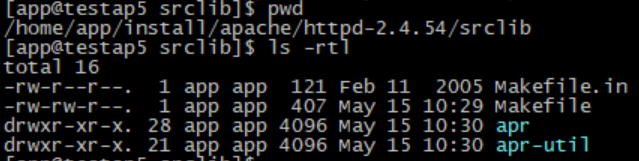
3. compile 실행
./configure --prefix=/sw/web/apache --enable-mods-shared=all --enable-so --enable-rewrite --enable-proxy --enable-proxy-ajp --enable-proxy-balancer --enable-proxy-http --enable-proxy-connect --enable-ssl --with-included-apr

make && make install
--prefix=/sw/web/apache : 아파치 설치할 디렉토리 경로로 작성
pcre2를 패키지 다운로드하지 않고, 별도로 컴파일해서 사용하고 싶은 경우 아래와 같이 할 것
(!! Apache는 PCRE2를 apr처럼 srclib 내부에서 자동 빌드하지 않기 때문에 별도로 컴파일 해야 함)
cd httpd-2.4.65/srclib/pcre2
./configure --prefix=/usr/local/pcre2
make && make install
cd ../../   # httpd-2.4.65 최상위로
./configure --prefix=/sw/web/apache \
  --enable-mods-shared=all \
  --enable-so \
  --enable-rewrite \
  --enable-proxy \
  --enable-proxy-ajp \
  --enable-proxy-balancer \
  --enable-proxy-http \
  --enable-proxy-connect \
  --enable-ssl \
  --with-included-apr \
  --with-pcre=/usr/local/pcre2/bin/pcre2-config
컴파일 옵션)
--enable-modules=all : 모든 모듈 컴파일
--endable-so : mod_so가 제공하는 DSO 기능 사용
--with-mpm-shared=all : MPM 모듈 세가지 event, prefork, worker를 다이나믹 모듈로 컴파일
※ apache 2.4 부터 event 모듈 제공, 이전버전은 prefork, worker 2가지 모듈만 사용
※ apache 2.4 부터 mpm 옵션을 주지 않을 경우, default는 event
4. 실행
cd /sw/web/apache/bin
./apachectl start
※ AH00558: httpd: Could not reliably determine the server's fully qualified domain name, using 192.168.56.101. Set the 'ServerName' directive globally to suppress this message
다음과 같은 메세지 발생할 경우 httpd.conf 파일에서 ServerName 주석해제 후 ip 또는 domain 이름으로 설정할 것
5. 버전 확인
cd /sw/web/apache/bin
./apachectl -V (또는 ./httpd -V)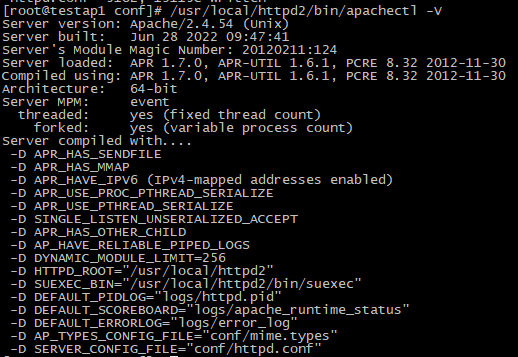
728x90
반응형
'WEB > APACHE' 카테고리의 다른 글
| 4. 1024 이하 포트 사용 설정 (0) | 2023.05.22 |
|---|---|
| 2.1. Compile 설치 과정 (0) | 2023.05.22 |
| 1. 설치 [YUM] (0) | 2023.05.22 |
| 5. Apache - Jboss(Wildfly) 연동(mod_jk) (0) | 2022.10.28 |
| 3. apache 기동/중지 및 상태 확인 (0) | 2022.10.26 |

