디렉토리 리스팅(=디렉토리 인덱싱)
웹 어플리케이션을 사용하고 있는 서버의 미흡한 설정으로 인해 인덱싱 기능이 활성화 되어 있을 경우 공격자가 강제 브라우징을 통해 서버내의 모든 디렉터리 및 파일에 대해 인덱싱이 가능하여 웹 어플리케이션 및 서버의 주요 정보가 노출될수 있음
=> 보이지 말아야 할 디렉토리가 보이는 것
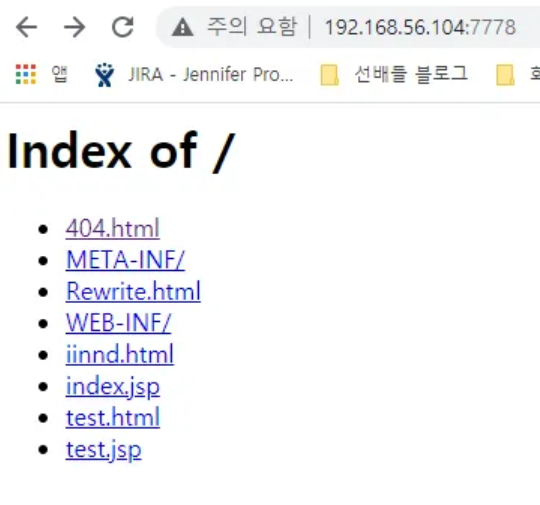
디렉토리 인덱싱 진단 구문
- /icons/
- /images/
- /pr/
- /adm, /files, /download
- /files/attach/images, /data/, /files/ 등
- %3f.jsp (=> 아파치 서버에서 먹히는 곳이 있음)
모든플랫폼 공통, 체크사항
테스트 해야하는 특수 문자 목록 : [.], [%2E], [+], [%2B], [%2A], [\], [%5C], [?], [%3F], [%20], [%00]
디렉토리 인덱싱 취약점 대응 방안
1. 아파치(APACHE)
Apache 설정 파일인 httpd.conf 파일에서 DocumentRoot 항목의 Options 에서 Indexes를 제거하거나 -Indexes로 변경 Indexes가 해당 디렉토리의 파일 목록을 보여주는 지시자임
<Directory "/usr/local/apache/htdocs">
	Options FollowSymLinks
</Directory>

또는

<Directory "/usr/local/apache/htdocs">
	Options -Indexes FollowSymLinks
</Directory>
2. IIS
설정 - 제어판 - 관리도구 - "인터넷 서비스 관리자" 선택
웹사이트 우클릭 후 등록 정보의 [홈 디렉토리] 탭에서 [디렉토리 검색] 체크를 해제
3. OHS
아파치와 동일
4. WebLogic
웹어플리케이션 /WEB-INF/weblogic.xml 파일을 다음과 같이 설정
<container-descriptor>
	<index-directory-enabled>false</index-directory-enabled>
</container-descriptor>
5. JBoss
https://access.redhat.com/solutions/3533341
How to enable directory listing of static content in JBoss EAP 7 - Red Hat Customer Portal
How do I enable directory listing in EAP 7? I would like to enable directory listing for the application which is deployed in EAP 7. I was able to do this with EAP 6.4 using the following CLI. What is the equivalent configuration in EAP 7? /subsystem=web/c
access.redhat.com
standalone-ha.xml에서 다음과 같이 설정
배포된 어플리케이션인 경우)
    <subsystem xmlns="urn:jboss:domain:undertow:4.0">
        ...
        <servlet-container name="default" directory-listing="false">
            <jsp-config/>
            <websockets/>
        </servlet-container>
undertow 시스템 파일 핸들러인 경우)
    <subsystem xmlns="urn:jboss:domain:undertow:4.0">
        ...
        <server name="default-server">
            <http-listener name="default" socket-binding="http" ... />
            ...
            <host name="default-host" alias="localhost">
                <location name="/" handler="welcome-content" />
                <location name="/example" handler="example-file-handler" />
            </host>
        </server>
        ...
        <handlers>
            <file name="welcome-content" path="${jboss.home.dir}/welcome-content" />
            <file name="example-file-handler" path="/path/to/example/static-contents" directory-listing="false"/>
</handlers>'WEB > APACHE' 카테고리의 다른 글
| 23. ssl 인증서 암호 해제 (0) | 2025.12.23 |
|---|---|
| 22. 작업 중 페이지 설정(ErrorDocument) (0) | 2025.12.23 |
| 20. forward proxy 설정 (0) | 2025.12.03 |
| 19. reverse proxy 설정(=gateway server) (0) | 2025.12.03 |
| 18. proxy (0) | 2025.12.03 |