https://tomcat.apache.org/tomcat-9.0-doc/jndi-resources-howto.html#Global_configuration
Apache Tomcat 9 (9.0.115) - JNDI Resources How-To
Tomcat provides a JNDI InitialContext implementation instance for each web application running under it, in a manner that is compatible with those provided by a Java Enterprise Edition application server. The Java EE standard provides a standard set of ele
tomcat.apache.org
https://m.blog.naver.com/solinsystem/221598698889
톰캣 JDBC Datasource 적용 | Tomcat 구축 및 기술지원 | 오픈소스 WEB/WAS 책임 기술지원 전문기업-(주)솔
이번 글에서는 톰캣 서버에서 데이터베이스를 설정할 수 있는 JDBC Datasource 적용 방법을 알아보겠...
blog.naver.com
1. server.xml
<GlobalNamingResources> 태그 안에 작성
#postgresql
<Resource name="jdbc/DBName"
                    auth="Container"
                    type="javax.sql.DataSource"
                    driverClassName="org.postgresql.Driver"
                    loginTimeout="10"
                    maxWait="5000"
                    username="아이디"
                    password="비밀번호"
                    testOnBorrow="true"
                    url="jdbc:postgresql://127.0.0.1/디비이름" />

#oracle
<Resource name="jdbc/orcl"
              auth="Container" type="javax.sql.DataSource"
              username="oracle" password="oracle"
              driverClassName="oracle.jdbc.driver.OracleDriver"
              url="jdbc:oracle:thin:@192.168.56.103:1521:orcl"
              initialSize="7" maxTotal="10" maxIdle="10" minIdle="5"
              maxWaitMillis="-1" removeAbandonedOnBorrow="true"
              removeAbandonedOnMaintenance="true" removeAbandonedTimeout="30"
              logAbandoned="true" minEvictableIdleTimeMillis="6000"/>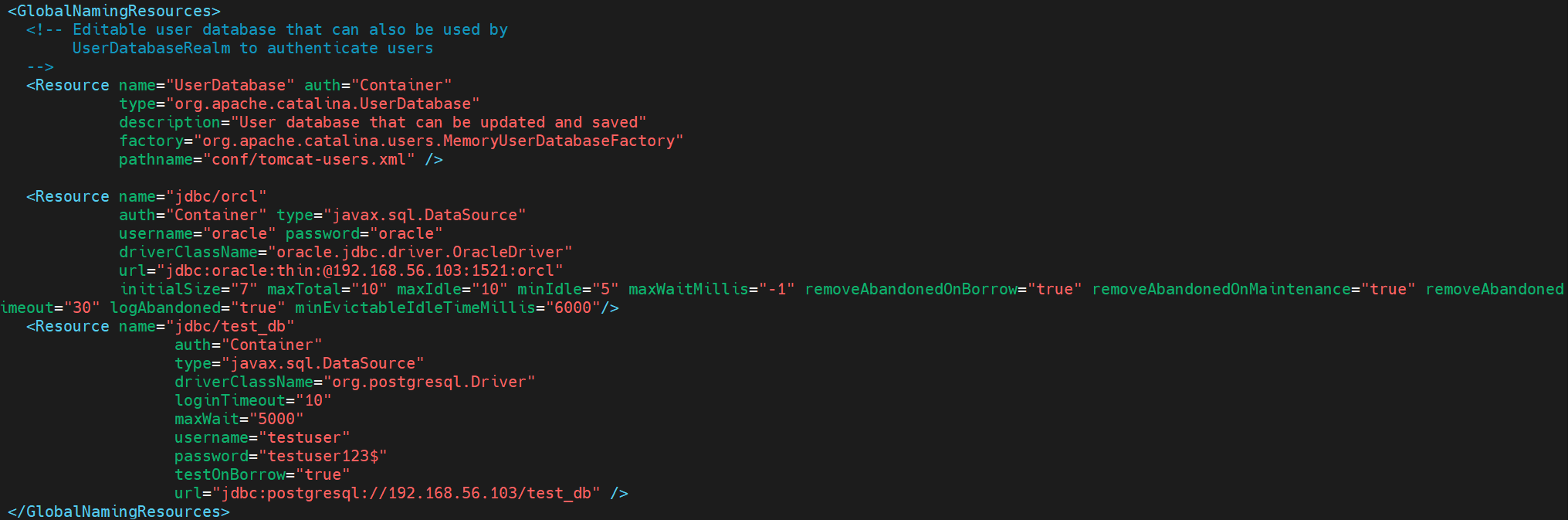
2. web.xml (어플리케이션의 web.xml)
<resource-ref>
  <description>
    Resource reference to a factory for javax.mail.Session
    instances that may be used for sending electronic mail
    messages, preconfigured to connect to the appropriate
    SMTP server.
  </description>
  <res-ref-name>mail/Session</res-ref-name>
  <res-type>javax.mail.Session</res-type>
  <res-auth>Container</res-auth>
</resource-ref>

#oracle
<resource-ref>
  <res-ref-name>jdbc/orcl</res-ref-name>
  <res-type>javax.sql.DataSource</res-type>
  <res-auth>Container</res-auth>
</resource-ref>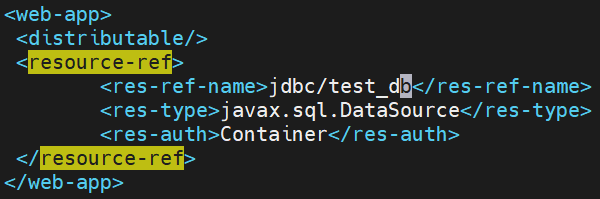
3. context.xml
<Context>

    <!-- Default set of monitored resources. If one of these changes, the    -->
    <!-- web application will be reloaded.                                   -->
    <WatchedResource>WEB-INF/web.xml</WatchedResource>
    <WatchedResource>WEB-INF/tomcat-web.xml</WatchedResource>
    <WatchedResource>${catalina.base}/conf/web.xml</WatchedResource>

    <!-- Uncomment this to disable session persistence across Tomcat restarts -->
    <!--
    <Manager pathname="" />
    -->
    <!-- oracle -->
    <ResourceLink name="jdbc/orcl"
                  global="jdbc/orcl" auth="Container"
                  type="javax.sql.DataSource" />
    <!-- postgresql -->
    <Resource name="jdbc/postgres" auth="Container"
            type="javax.sql.DataSource" driverClassName="org.postgresql.Driver"
            url="jdbc:postgresql://192.168.56.103:5432/test_db" username="testuser" password="testuser123$"
            maxTotal="20" maxIdle="10" maxWaitMillis="-1"/>
</Context>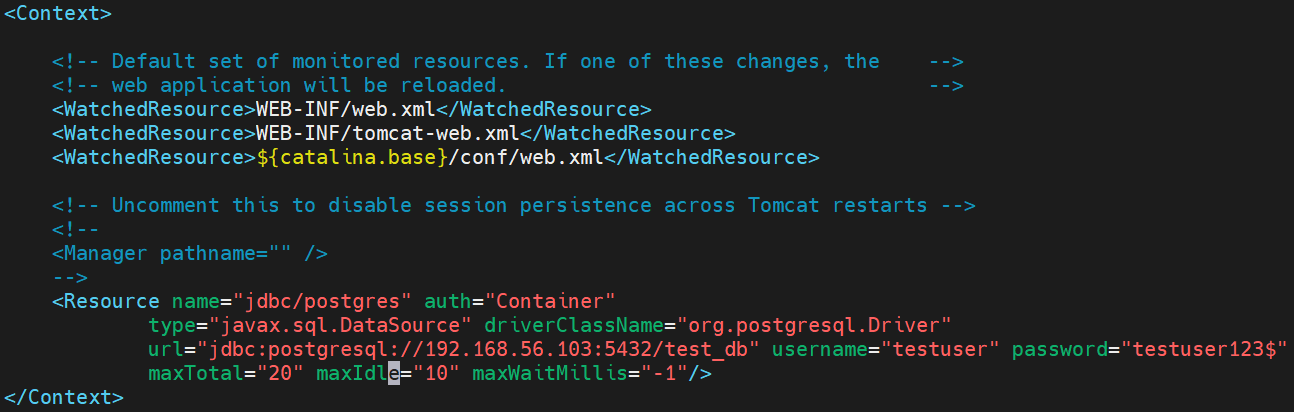
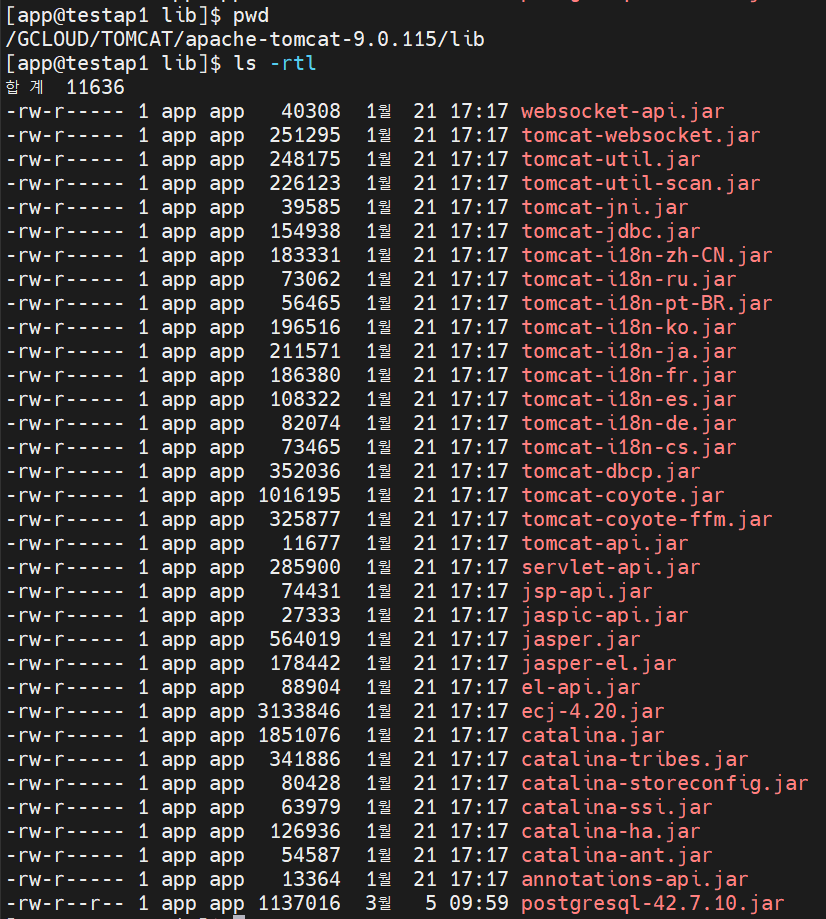
4. jdbc 드라이버
버전에 맞는 jdbc 드라이버를 다운로드하여 ${CATALINA_HOME}/lib 경로에 위치시키기
'WAS > TOMCAT' 카테고리의 다른 글
| 9. JSP 65535 byte 용량 초과 (0) | 2026.02.19 |
|---|---|
| 8. deploy (0) | 2026.02.09 |
| 7. 로그 설정 (0) | 2026.01.30 |
| 6. tomcat 클러스터링 2 (0) | 2023.07.24 |
| 5. tomcat 클러스터링 (0) | 2023.07.14 |