Migration Guide | Red Hat JBoss Enterprise Application Platform | 8.1 | Red Hat Documentation
This section describes additional changes that might be required for migrating an application from JBoss EAP 6.4 or 7.x to JBoss EAP 8.1. As part of Jakarta EE Concurrency 3.0, you can customize the ContextService property by using context types. The Trans
docs.redhat.com
1. 7.4 서버 중지 후 백업
2. 8.1 서버 설치(기동x)
인스턴스 하위까지 구성
ex) 기존 7 버전의 AP_name10 인스턴스 복사
3. JBoss Server Migration Tool로 설정 변환
Using the JBoss Server Migration Tool | Red Hat JBoss Enterprise Application Platform | 8.1 | Red Hat Documentation
Red Hat JBoss Enterprise Application Platform FormatMulti-pageSingle-pageView full doc as PDF
docs.redhat.com
1) tool 다운로드 후 별도 경로에 압축 해제
The world's open source leader
Red Hat is the world’s leading provider of open source solutions, using a community-powered approach to provide reliable and high-performing cloud, virtualization, storage, Linux, and middleware technologies. Red Hat also offers award-winning support, tr
www.redhat.com
2) Migration Tool properties 설정
변경할 구성 파일 또는 요소에 대한 내용 설정
${Tool_home}/configuration 경로의 environment.properties 파일 설정

###############################################
### JBoss Server Migration Environment ###
###############################################

# Please refer to user guide for these properties specification #

####### REPORTS

report.html.fileName=migration-report.html
report.html.maxTaskPathSizeToDisplaySubtasks=4
report.html.templateFileName=migration-report-template.html
report.summary.maxTaskPathSizeToDisplaySubtasks=3
report.xml.fileName=migration-report.xml

####### SERVER PATHS

#server.source.standalone.serverDir=standalone
#server.source.standalone.configDir=configuration
#server.source.standalone.configFiles=standalone.xml,standalone-full.xml
#server.source.domain.domainDir=domain
#server.source.domain.configDir=configuration
#server.source.domain.domainConfigFiles=domain.xml
#server.source.domain.hostConfigFiles=host.xml

#server.target.standalone.serverDir=standalone
#server.target.standalone.configDir=configuration
#server.target.domain.domainDir=domain
#server.target.domain.configDir=configuration

####### TASKS

# If set, and the tool is running in non-interactive mode, the source's standalone server configurations are not migrated
#standalone.skip=true

# If set, and the tool is running in non-interactive mode, the source's managed domain configurations are not migrated
#domain.skip=true

### If set any deployment found is not migrated in non-interactive mode
deployments.migrate-deployments.skip=true
### If set any persistent deployment found is not migrated in non-interactive mode
#deployments.migrate-persistent-deployments.skip=true
### If set any deployment found in a directory watched by a deployment scanner, is not migrated in non-interactive mode
#deployments.migrate-deployment-scanner-deployments.skip=true

# a list with module names of extensions to exclude when migrating a server configuration
extensions.excludes=
# a list with module names of extensions to include when migrating a server configuration
extensions.includes=
# if set the migration of a server configuration will not remove any unsupported extensions
#extensions.remove-unsupported-extensions.skip=true

#management.setup-http-upgrade.skip=true
#management.setup-http-upgrade.management-interface.http-interface.enable-http-upgrade.skip=true
#management.setup-http-upgrade.socket-binding.management-https.update-port.port=${jboss.management.https.port:9993}
#management.setup-http-upgrade.socket-binding.management-https.update-port.skip=true

# a list with module names to migrate
modules.includes=
# a list with module names to not migrate
modules.excludes=
#modules.migrate-modules-requested-by-configuration.skip=true
#modules.migrate-modules-requested-by-user.skip=true

### If set no paths referenced in server configurations will be migrated
#paths.migrate-paths-requested-by-configuration.skip=true
### If set no paths referenced in vault configurations will be migrated
#paths.migrate-paths-requested-by-configuration.vault.skip=true
#paths.migrate-paths-requested-by-configuration.vault.KEYSTORE_URL.skip=true
#paths.migrate-paths-requested-by-configuration.vault.ENC_FILE_DIR.skip=true

#security-realms.migrate-properties.skip=true

#socket-binding.ajp.add-port-expression.skip=true
#socket-binding.http.add-port-expression.skip=true
#socket-binding.https.add-port-expression.skip=true
#socket-bindings.add-port-expressions.skip=true

# a list with xml namespaces (without version) of subsystems to exclude when migrating a server configuration
subsystems.excludes=
# a list with xml namespaces (without version) of subsystems to include when migrating a server configuration
subsystems.includes=
# if set the migration of a server configuration will not remove any unsupported subsystem configurations
#subsystems.remove-unsupported-subsystems.skip=true

#subsystem.batch-jberet.add.skip=true

# true이면 EE 서브시스템 전체업데이트 skip
#subsystem.ee.update.skip=true
# true이면 기본 Concurrency Utilities 설정을 추가하지 않음
#subsystem.ee.update.setup-ee-concurrency-utilities.skip=true
# true이면 Jakarta EE 기본 리소스 바인딩 설정을 건너뜀
#subsystem.ee.update.setup-jakartaee-default-bindings.skip=true
# 기본 Datasource에 연결할 JNDI 이름을 지정
#subsystem.ee.update.setup-jakartaee-default-bindings.defaultDataSourceJndiName=
# 기존 설정에서 기본 Datasource를 찾을 때 사용할 이름
subsystem.ee.update.setup-jakartaee-default-bindings.defaultDataSourceName=ExampleDS
# 기본 JMS Connection Factory의 JNDI 이름을 지정
#subsystem.ee.update.setup-jakartaee-default-bindings.defaultJmsConnectionFactoryJndiName=
# 기본 JMS Connection Factory를 찾을 때 사용할 이름
subsystem.ee.update.setup-jakartaee-default-bindings.defaultJmsConnectionFactoryName=hornetq-ra

#subsystem.ejb3.update.skip=true
#subsystem.ejb3.update.add-infinispan-passivation-store-and-distributable-cache.skip=true
#subsystem.ejb3.update.setup-default-sfsb-passivation-disabled-cache.skip=true
#subsystem.ejb3.update.activate-ejb3-remoting-http-connector.skip=true

#subsystem.infinispan.update.skip=false
#subsystem.infinispan.update.add-infinispan-ejb-cache.skip=true
#subsystem.infinispan.update.add-infinispan-server-cache.skip=true
#subsystem.infinispan.update.fix-hibernate-cache-module-name.skip=true

#subsystem.jacorb.migrate.skip=true

subsystem.logging.update.remove-console-handler.skip=true

#subsystem.messaging.migrate.skip=true

#subsystem.messaging-activemq.update.add-messaging-http-acceptors-and-connectors.httpAcceptorName=
#subsystem.messaging-activemq.update.add-messaging-http-acceptors-and-connectors.httpConnectorName=
#subsystem.messaging-activemq.update.add-messaging-http-acceptors-and-connectors.skip=true
#subsystem.messaging-activemq.update.add-messaging-http-acceptors-and-connectors.socketBindingName=
#subsystem.messaging-activemq.update.add-messaging-http-acceptors-and-connectors.undertowHttpListenerName=
#subsystem.messaging-activemq.update.add-messaging-http-acceptors-and-connectors.undertowServerName=
#subsystem.messaging-activemq.update.skip:

#subsystem.remoting.update.skip=true
#subsystem.remoting.update.add-remoting-http-connector.skip=true

#subsystem.request-controller.add.skip=true

#subsystem.security-manager.add.skip=true

#subsystem.singleton.add.skip=true

#subsystem.undertow.update.skip=true
#subsystem.undertow.update.add-undertow-default-buffer-cache.skip=true
#subsystem.undertow.update.add-undertow-websockets.skip=true
#subsystem.undertow.update.migrate-undertow-http-listener.skip=true
설정 예시)
###############################################
### JBoss Server Migration Environment ###
###############################################

# Please refer to user guide for these properties specification #

####### REPORTS

report.html.fileName=migration-report.html
report.html.maxTaskPathSizeToDisplaySubtasks=4
report.html.templateFileName=migration-report-template.html
report.summary.maxTaskPathSizeToDisplaySubtasks=3
report.xml.fileName=migration-report.xml

####### SERVER PATHS

server.source.standalone.serverDir=/sw/jboss-eap-7.4/domains/AP_name10
server.source.standalone.configDir=configuration
server.source.standalone.configFiles=standalone-ha.xml
#server.source.domain.domainDir=domain
#server.source.domain.configDir=configuration
#server.source.domain.domainConfigFiles=domain.xml
#server.source.domain.hostConfigFiles=host.xml

server.target.standalone.serverDir=/sw/jboss-eap-8.1/domains/AP_name10
server.target.standalone.configDir=configuration
#server.target.domain.domainDir=domain
#server.target.domain.configDir=configuration

####### TASKS

# If set, and the tool is running in non-interactive mode, the source's standalone server configurations are not migrated
#standalone.skip=true

# If set, and the tool is running in non-interactive mode, the source's managed domain configurations are not migrated
domain.skip=true

### If set any deployment found is not migrated in non-interactive mode
#deployments.migrate-deployments.skip=true
### If set any persistent deployment found is not migrated in non-interactive mode
#deployments.migrate-persistent-deployments.skip=true
### If set any deployment found in a directory watched by a deployment scanner, is not migrated in non-interactive mode
#deployments.migrate-deployment-scanner-deployments.skip=true

# a list with module names of extensions to exclude when migrating a server configuration
extensions.excludes=
# a list with module names of extensions to include when migrating a server configuration
extensions.includes=
# if set the migration of a server configuration will not remove any unsupported extensions
#extensions.remove-unsupported-extensions.skip=true

#management.setup-http-upgrade.skip=true
#management.setup-http-upgrade.management-interface.http-interface.enable-http-upgrade.skip=true
#management.setup-http-upgrade.socket-binding.management-https.update-port.port=${jboss.management.https.port:9993}
#management.setup-http-upgrade.socket-binding.management-https.update-port.skip=true

# a list with module names to migrate
modules.includes=
# a list with module names to not migrate
modules.excludes=
#modules.migrate-modules-requested-by-configuration.skip=true
#modules.migrate-modules-requested-by-user.skip=true

### If set no paths referenced in server configurations will be migrated
#paths.migrate-paths-requested-by-configuration.skip=true
### If set no paths referenced in vault configurations will be migrated
#paths.migrate-paths-requested-by-configuration.vault.skip=true
#paths.migrate-paths-requested-by-configuration.vault.KEYSTORE_URL.skip=true
#paths.migrate-paths-requested-by-configuration.vault.ENC_FILE_DIR.skip=true

#security-realms.migrate-properties.skip=true

#socket-binding.ajp.add-port-expression.skip=true
#socket-binding.http.add-port-expression.skip=true
#socket-binding.https.add-port-expression.skip=true
#socket-bindings.add-port-expressions.skip=true

# a list with xml namespaces (without version) of subsystems to exclude when migrating a server configuration
subsystems.excludes=
# a list with xml namespaces (without version) of subsystems to include when migrating a server configuration
subsystems.includes=
# if set the migration of a server configuration will not remove any unsupported subsystem configurations
#subsystems.remove-unsupported-subsystems.skip=true

#subsystem.batch-jberet.add.skip=true

#subsystem.ee.update.skip=true
#subsystem.ee.update.setup-ee-concurrency-utilities.skip=true
subsystem.ee.update.setup-jakartaee-default-bindings.skip=false
subsystem.ee.update.setup-jakartaee-default-bindings.defaultDataSourceJndiName=PostgresDS
subsystem.ee.update.setup-jakartaee-default-bindings.defaultDataSourceName=java:jboss/datasources/PostgresDS
#subsystem.ee.update.setup-jakartaee-default-bindings.defaultJmsConnectionFactoryJndiName=
#subsystem.ee.update.setup-jakartaee-default-bindings.defaultJmsConnectionFactoryName=hornetq-ra

#subsystem.ejb3.update.skip=true
#subsystem.ejb3.update.add-infinispan-passivation-store-and-distributable-cache.skip=true
#subsystem.ejb3.update.setup-default-sfsb-passivation-disabled-cache.skip=true
#subsystem.ejb3.update.activate-ejb3-remoting-http-connector.skip=true

#subsystem.infinispan.update.skip=false
#subsystem.infinispan.update.add-infinispan-ejb-cache.skip=true
#subsystem.infinispan.update.add-infinispan-server-cache.skip=true
#subsystem.infinispan.update.fix-hibernate-cache-module-name.skip=true

#subsystem.jacorb.migrate.skip=true

subsystem.logging.update.remove-console-handler.skip=true

#subsystem.messaging.migrate.skip=true

#subsystem.messaging-activemq.update.add-messaging-http-acceptors-and-connectors.httpAcceptorName=
#subsystem.messaging-activemq.update.add-messaging-http-acceptors-and-connectors.httpConnectorName=
#subsystem.messaging-activemq.update.add-messaging-http-acceptors-and-connectors.skip=true
#subsystem.messaging-activemq.update.add-messaging-http-acceptors-and-connectors.socketBindingName=
#subsystem.messaging-activemq.update.add-messaging-http-acceptors-and-connectors.undertowHttpListenerName=
#subsystem.messaging-activemq.update.add-messaging-http-acceptors-and-connectors.undertowServerName=
#subsystem.messaging-activemq.update.skip:

#subsystem.remoting.update.skip=true
#subsystem.remoting.update.add-remoting-http-connector.skip=true

#subsystem.request-controller.add.skip=true

#subsystem.security-manager.add.skip=true

#subsystem.singleton.add.skip=true

#subsystem.undertow.update.skip=true
#subsystem.undertow.update.add-undertow-default-buffer-cache.skip=true
#subsystem.undertow.update.add-undertow-websockets.skip=true
#subsystem.undertow.update.migrate-undertow-http-listener.skip=true

#subsystem.web.migrate.skip=true
3. JAVA 설정
JBoss 8.1은 jdk 17, jdk21 이상을 지원
jboss-server-migration.sh을 실행하려면 위의 자바 버전이 필요함
환경 변수 설정
JAVA_HOME=/usr/local/bin/jdk-17.0.0.1
PATH=$JAVA_HOME/bin:$PATH
4. jboss-server-migration.sh 실행(디폴트 interactive 모드)
!! JBoss 서버 마이그레이션 도구를 실행하면, 설치 시점부터 도구 실행 시점까지 대상 서버에 적용된 모든 변경 사항이 사라짐
또한, 대상 서버 디렉터리에 대해 이 도구를 여러 번 실행하면, 이후 실행 시 처음 실행 시 백업된 원본 설정 파일이 덮어쓰여짐
이는 도구의 각 실행이 구성 파일 뒤에 .beforeMigration을 추가하여 백업하기 때문에, 기존에 백업된 구성 파일이 모두 사라지기 때문
./jboss-server-migration.sh -s /sw/jboss-eap-7.4 -t /sw/jboss-eap-8.1 -e ./configuration/environment.properties
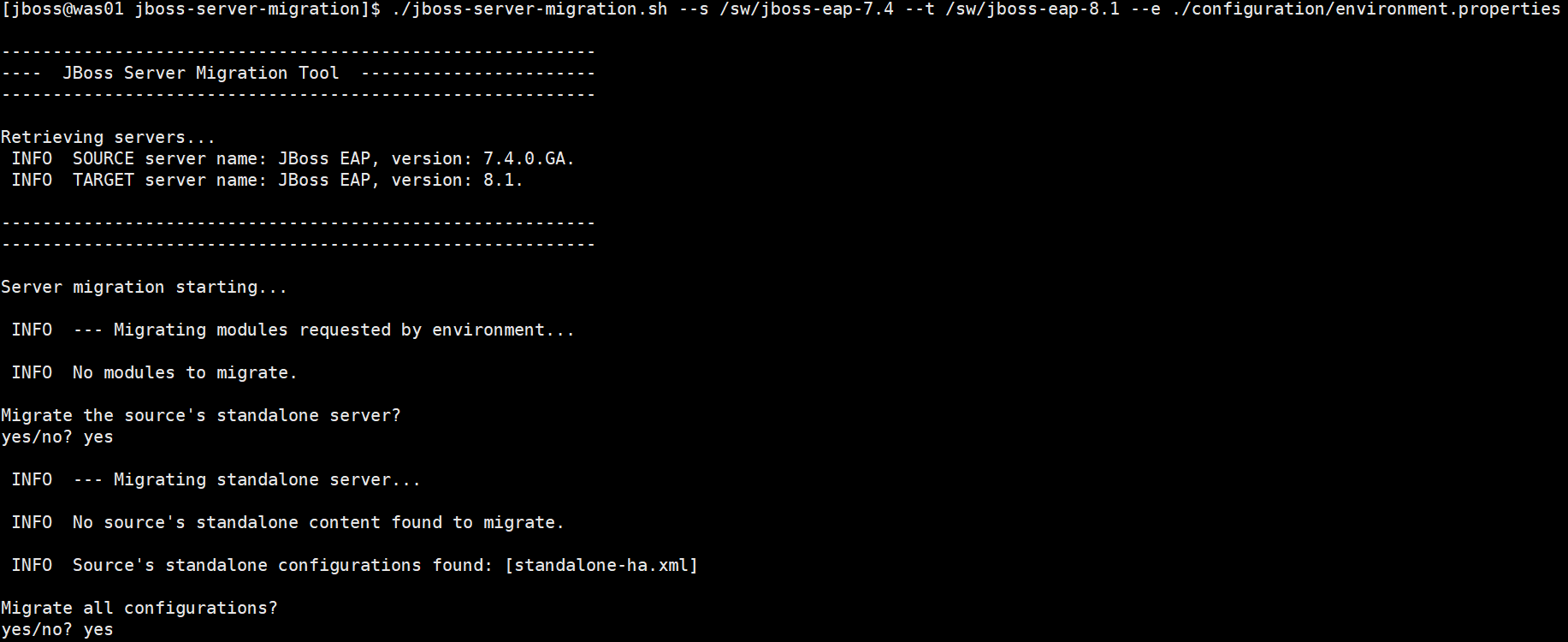
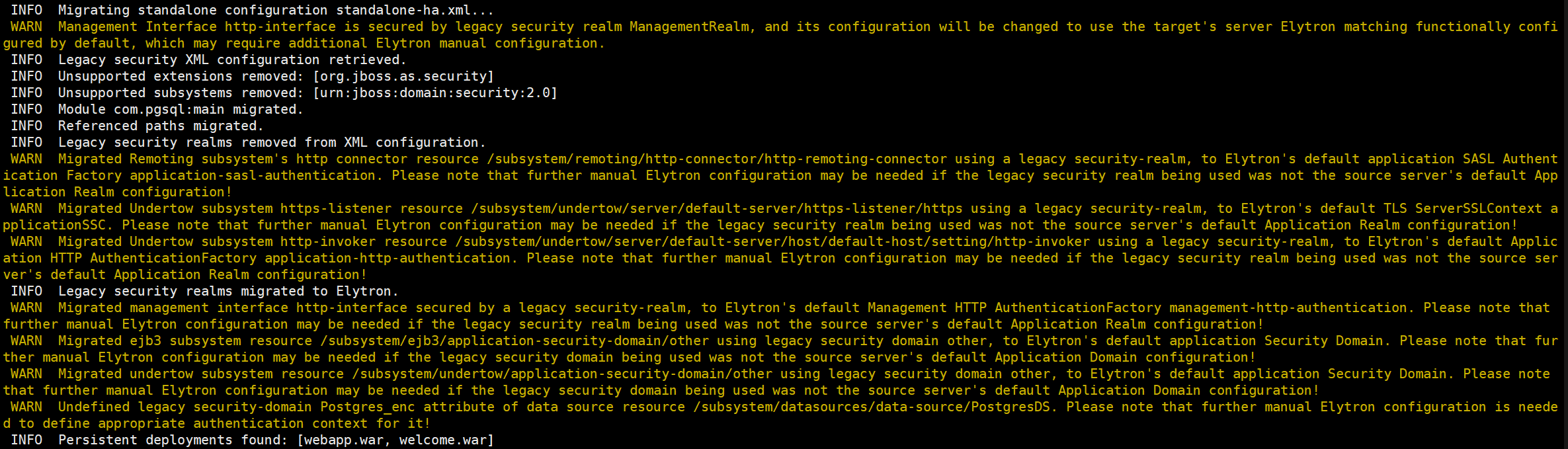
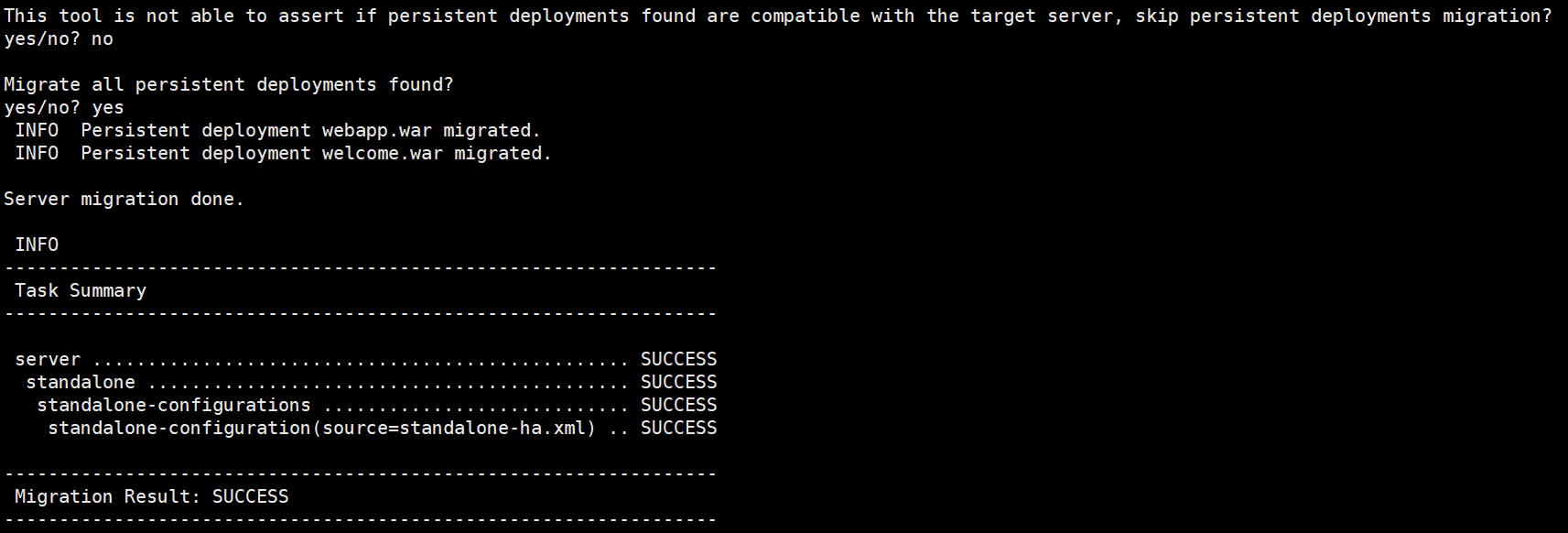
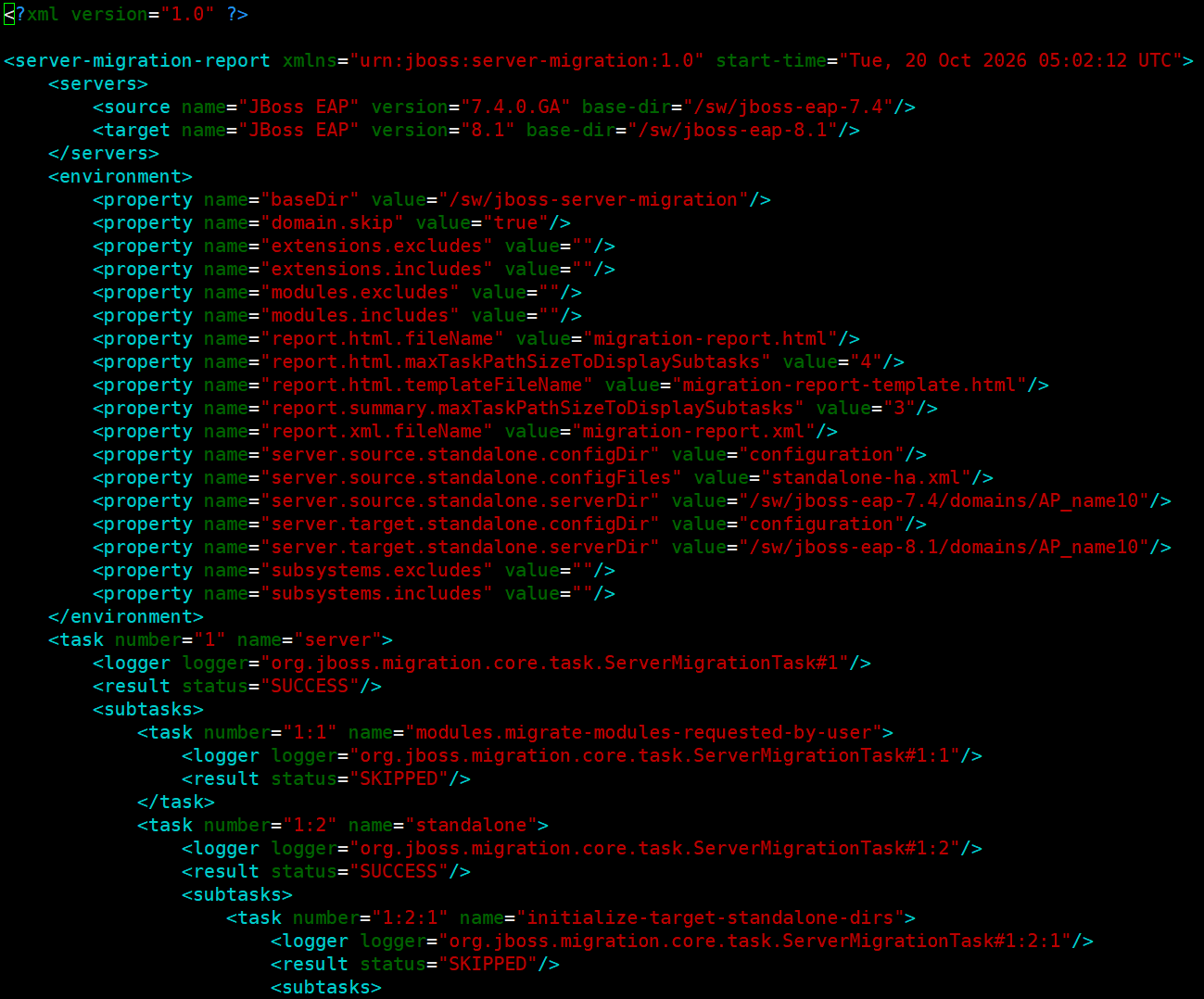
5. 실행 결과 검토
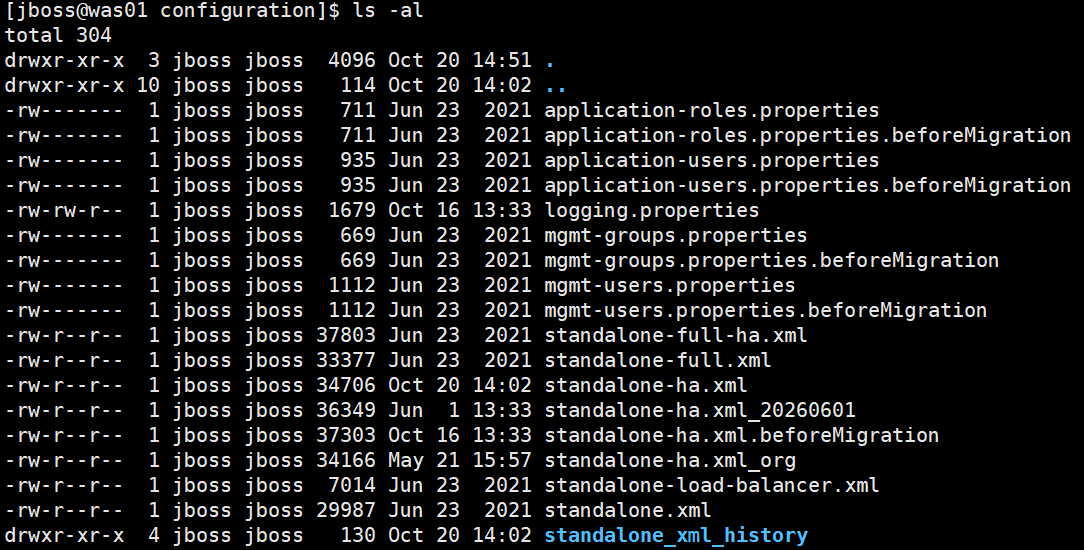
target 서버의 configuration 디렉토리 내의 기존 conf 파일들은 .beforeMigration 이름으로 백업됨
tool 경로의 report 디렉토리에 변경된 내용에 대한 보고서가 생성됨

(..이하 생략)
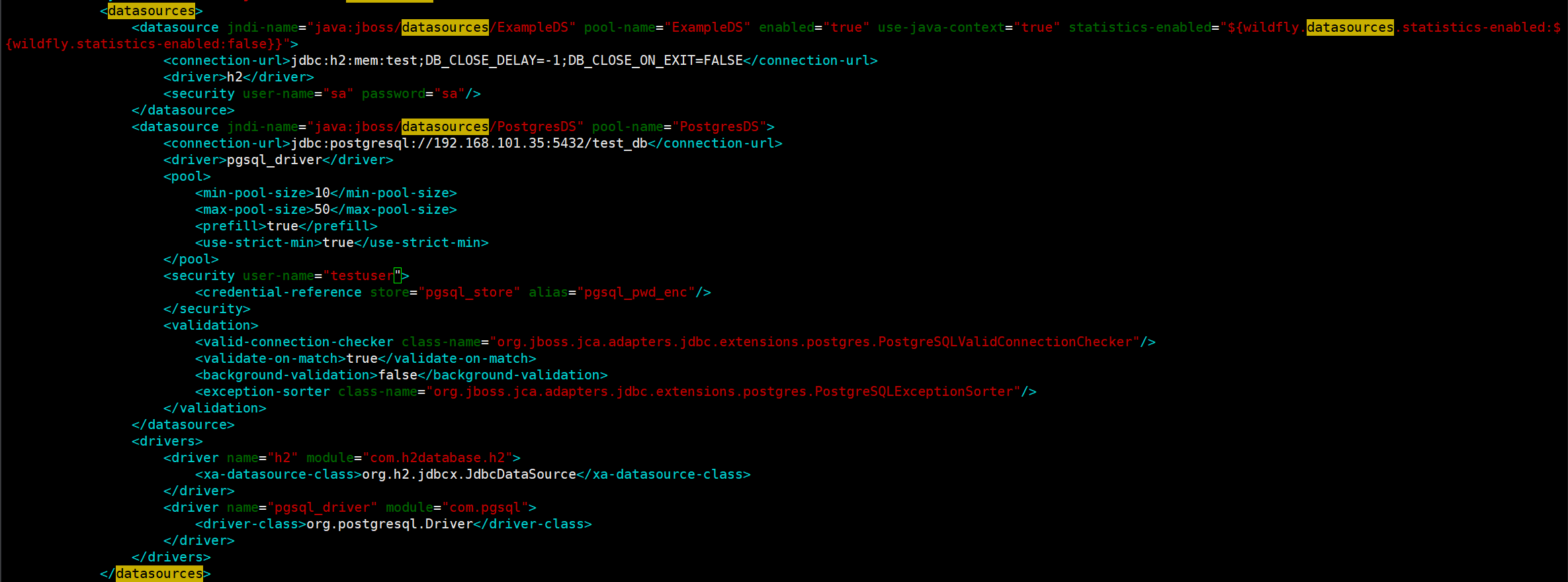
6. logging.properties, env.sh 파일 내용 수정
tool은 loggiong.properties, env.sh 파일 내용은 수정해주지 않음
데이터 소스 암호화 했다면 별도로 재진행 필요(7과 8의 암호화 방식이 다름)

7. 어플리케이션 수정
어플리케이션용 마이그레이션 툴이 별도로 존재
https://developers.redhat.com/products/mta/download
Download the Migration toolkit for applications | Red Hat Developer
Evaluate container-suitability, analyze source code, and modernize legacy applications to cloud-native technologies faster with the migration toolkit for applications. Architects can build and manage
developers.redhat.com
8. 서버 기동 및 서비스 확인
'WAS > JBOSS_WILDFLY' 카테고리의 다른 글
| 37. DataSource DB Password 암호화(JBoss 7) (0) | 2026.06.01 |
|---|---|
| 36. 디폴트 Datasource 제거 (0) | 2026.05.19 |
| 35. JBoss ERROR 코드 (0) | 2026.04.01 |
| 34. JBoss 7.4 한글 깨짐 현상 (0) | 2026.03.20 |
| 33. JBoss session timeout (0) | 2026.03.16 |